The Editor: Draft and edit documents
Learn how to create, edit, and export documents using the Editor.

Creating legal documents is an integral part of legal work, but it's also enormously time-consuming: research results need to be organized, initial drafts formulated, and then iteratively refined.
The Editor feature in Noxtua lets you do all these steps efficiently in one system. You can create and edit legal texts from scratch in a flexible workspace with AI assistance – ideal for memos, contract drafts, and legal opinions. The result: practical drafts you can process directly.
What is the Editor?
The Editor is a workspace in Noxtua that enables you to draft and edit legal documents quickly. In its first version, it is especially helpful for exploring initial ideas, organizing unstructured information, or creating new documents based on reference materials. Beck-Noxtua provides you with a first draft that you can edit manually or with AI assistance and refine through additional research. All text changes are transparently documented, so you maintain full control over your document at all times.
You can open the Editor by selecting the "Editor" button below the input field in the chat.

What can I use the Editor for?
The Editor is versatile and supports you with various tasks:
Transform research results into structured documents
After comprehensive research on a legal topic, the Editor helps you structure the research results as a memo or legal opinion in no time.
Develop initial drafts and document structures
Use the Editor to explore and develop legal arguments, and enrich them with relevant source references. First, create a basic structure and refine it step by step before moving to the final version.
Create documents from scratch
Create drafts based on your specifications and reference materials. Enter your instructions as a prompt, upload reference documents or guidelines if needed, and Noxtua generates an initial draft you can refine step by step.
Key functions at a glance
Text editing and AI assistance
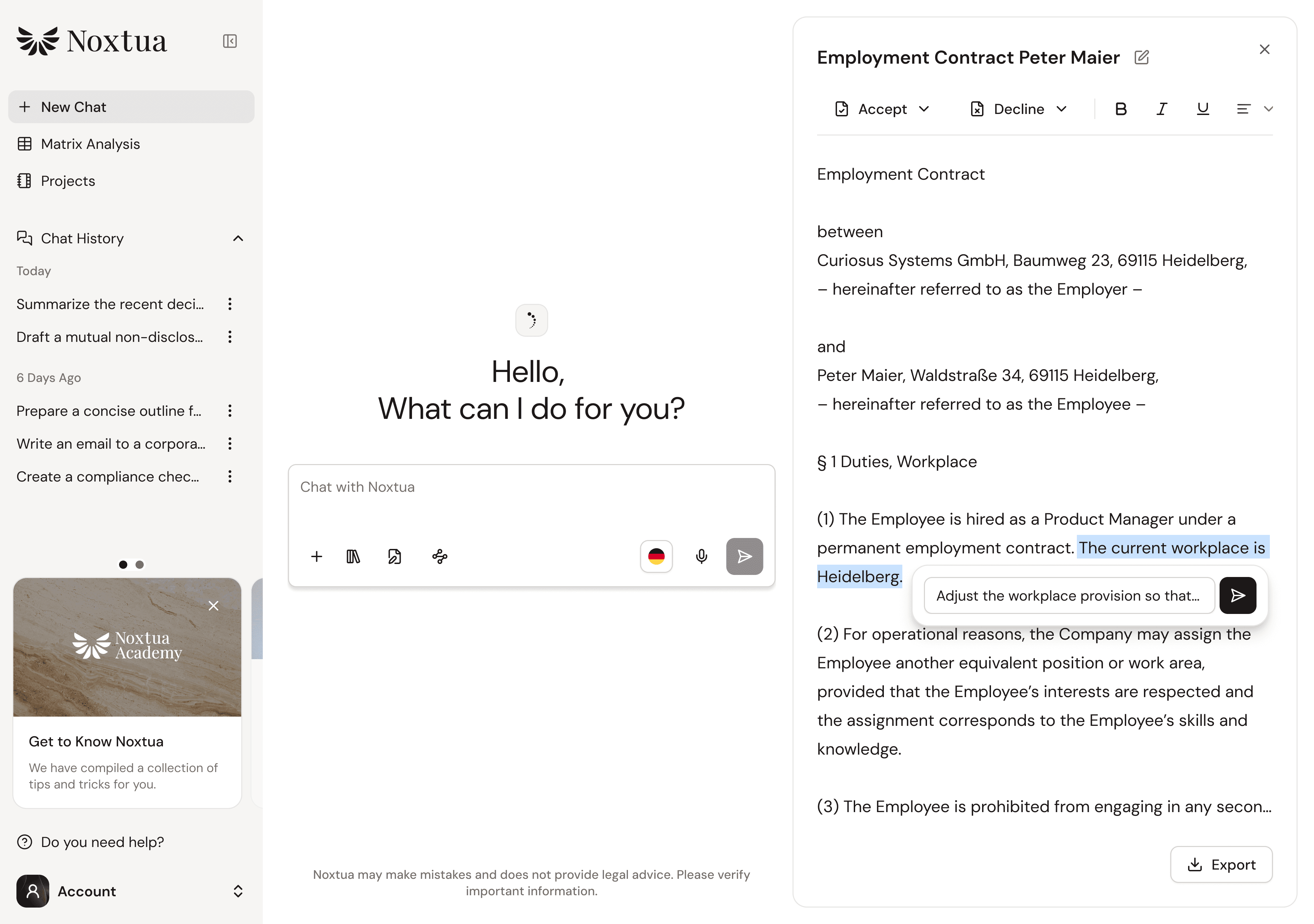
In the Editor, you can edit text directly. Either make manual adjustments, highlight sections and instruct the AI to modify them, or research additional legal context.
Suggested changes and change tracking
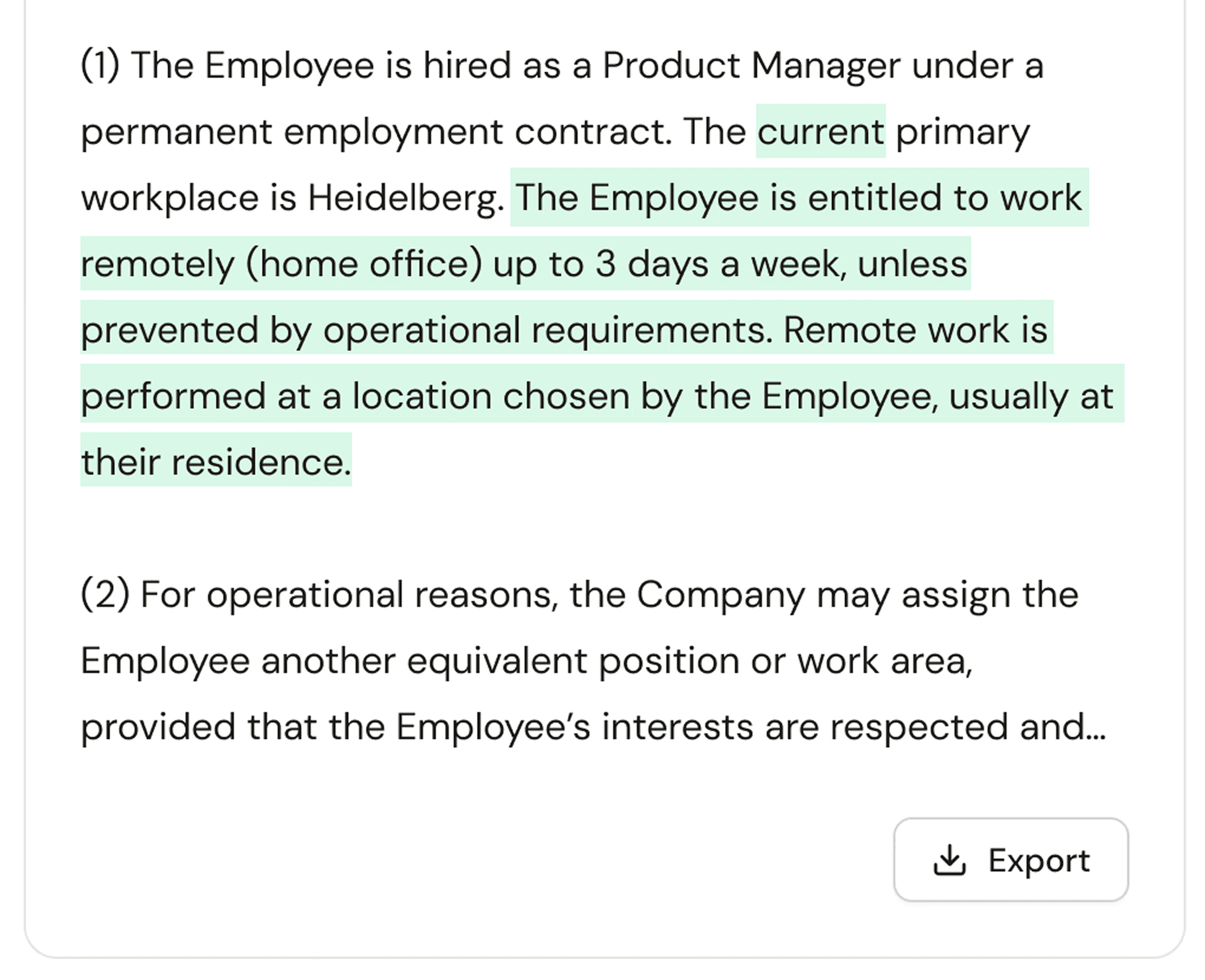
If you wish, Noxtua provides concrete improvement suggestions for text passages. You can accept or reject each suggestion, and all changes are transparently tracked.
Chat integration
While working in the Editor (right window), you can ask questions in the chat (left window) at any time: have clauses explained, request a different document structure, or research additional information. Specify in your prompt that the answer should appear in the chat if you don't want direct editing in the Editor.
Export functions
Once your document meets the desired quality, you can export it to Word as a .docx file – including all source references – for further processing.
Step by step: From research to memorandum
This common use case shows how the Editor can accelerate your work: You've conducted research on a complex legal topic and want to create a structured memorandum from it.
Step 1: Conduct research
First, ask your legal question in the chat, and have the AI conduct comprehensive research based on commentaries, journals, handbooks, statutes, and court decisions.
Step 2: Open the Editor and generate a document
After receiving all relevant information, open the Editor. Instruct Noxtua in the chat to create a structured memorandum based on your research results. The AI analyzes the previous research and creates an initial draft in the Editor.
Step 3: Refine draft
Now, the iterative refinement of your document begins. You have several options:
Direct text editing: Rewrite passages yourself and add content manually.
Targeted revision: Highlight individual sections and prompt in the small chat pop-up that opens to specify which changes you want. Noxtua now suggests revisions that you can accept or reject.
Additional research: Use the chat to ask follow-up questions, make comprehensive adjustments (e.g., a different structure), or research additional legal context.
Step 4: Export document
Once your memorandum is complete in content, you can export it to Word for final processing, including all source references.
Tips for efficient work
Use reference documents: Upload relevant documents that Noxtua should consider during creation, such as company guidelines or sample documents. The more precise your specifications, the better the generated draft will fit your requirements.
Work iteratively: The Editor was developed for an iterative workflow. First, create a basic structure, then refine individual sections step by step with AI assistance.
Open research results in the Editor: After you have conducted research, you can summarize the results in the Editor and continue working on them. This turns your research into a document draft without manually transferring information.
Conclusion: Your workspace for legal document creation
The Editor is your central workspace for creating and working on legal documents. It lets you focus on content while Noxtua supports you with research, structuring, and drafting. The seamless integration of text editing, AI assistance, and research functions accelerates your work – from the initial idea to the document draft you can export.

Dennis Engelhard